CAISSA Tools
CAISSA Polyglot Book Creator v0.3.1: Bigger Books, Offline Performance & Integrity
CAISSA now offers private browser conversion and a more capable offline Windows tool for building standard Polyglot BIN opening books from PGN collections.
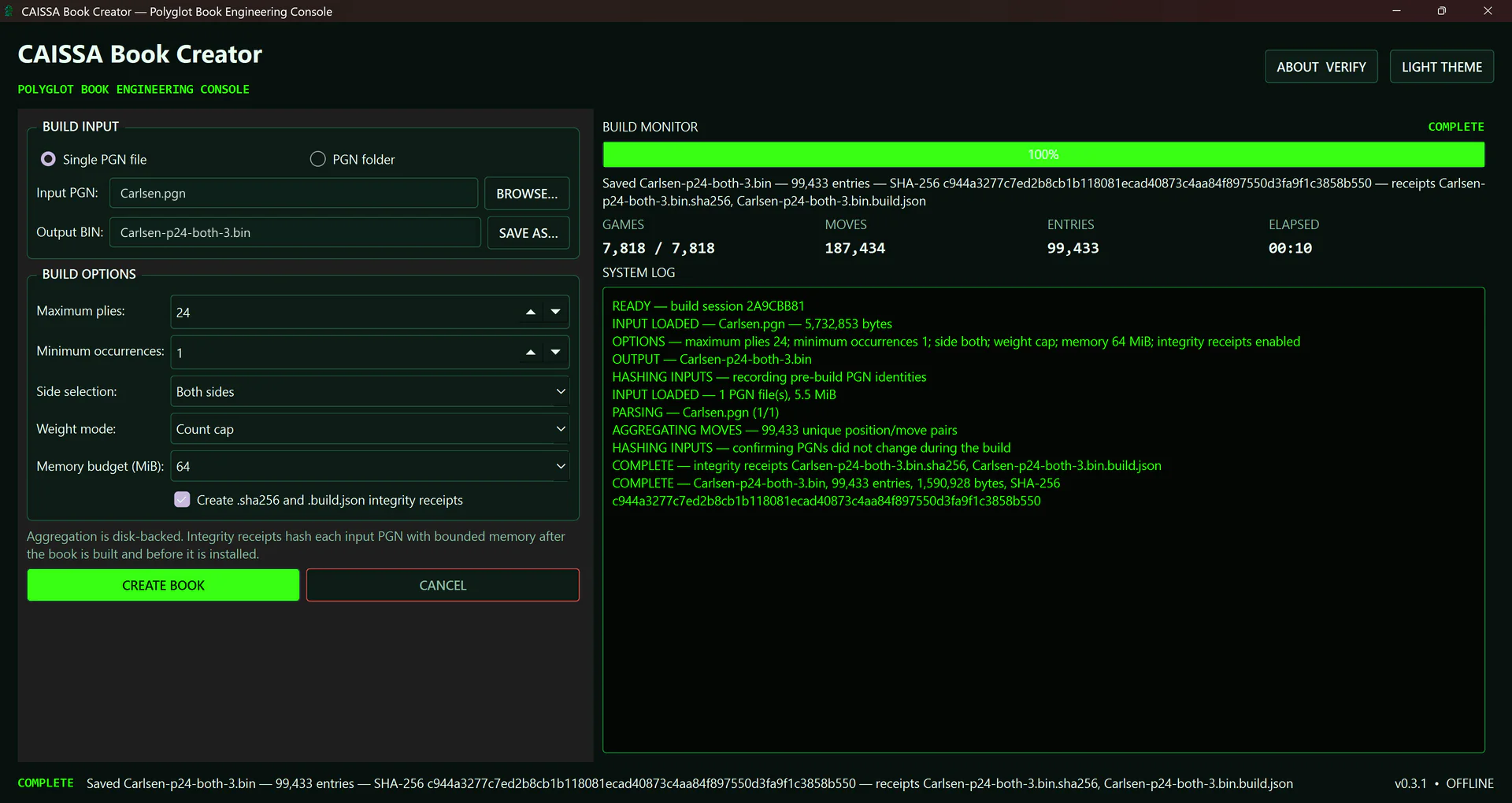
CAISSA has released two free ways to turn PGN collections into standard Polyglot BIN opening books. CAISSA Polyglot Online handles quick conversions in a browser, while CAISSA Book Creator Portable v0.3.1 brings the same practical goal to a Windows x64 desktop application designed for larger local databases.
Opening books let compatible chess software consult prepared position-and-move records before normal engine search begins. For engine enthusiasts, that makes a custom book useful for testing repertoires, shaping early-game variety, or studying how a chosen PGN collection represents an opening. Neither CAISSA tool evaluates positions: each organizes source games into book data that still needs review and testing.
Polyglot Online: Private Browser Conversion
A focused converter for everyday PGN files
The online converter accepts a PGN up to the tested 25 MiB input limit and processes it on the user's device. A dedicated Web Worker streams the main lines, validates supported moves, reports progress, and writes standard 16-byte Polyglot records without uploading the PGN to CAISSA. The worker keeps the interface responsive while the build runs.
Progress includes games, skipped records, moves, and unique book entries. A running build can be cancelled; the interface cleans up that worker and is ready for a fresh attempt. The 25 MiB ceiling is an intentional browser resource boundary, not a claim about the largest possible BIN output. It is also 25 MiB, using binary units, rather than 25 MB.
Portable v0.3.1: Built for Larger Collections
CAISSA Book Creator Portable v0.3.1 is a free, open-source Windows x64 application that works offline. It uses disk-backed aggregation so users can work beyond the online converter's browser-oriented limit. Controls cover maximum plies, minimum occurrence count, White, Black, or both sides, weighting mode, and a configurable memory budget. One ply is one half-move, so 24 plies correspond to 12 full moves.
The portable also supplies descriptive output names, overwrite protection, session logs, live progress, and light and dark themes. It can read one PGN or a folder of PGNs, and the build path writes and validates the Polyglot output before installation. It is intended for users whose local collections or repeatable workflows have outgrown the convenience of a browser tab.
Performance Results in Context
A real-world validation successfully processed an approximately 820 MiB PGN collection. A separate high-cardinality capacity benchmark used 180,000 generated legal games and recorded 17,078,075 moves, 16,441,386 unique Polyglot entries, and 263,062,176 output bytes, or about 250.9 MiB. An independent record reader confirmed strict sorting, uniqueness, valid promotion codes, nonzero weights, and zeroed learn fields.
The featured Carlsen demonstration is a normal conversion, not that capacity benchmark. With a 24-ply depth, the application processed 7,818 games and 187,434 moves into 99,433 entries and a 1,590,928-byte BIN. The screenshot shows 100% completion at about 10 seconds. These measurements document tested workloads; they are not guaranteed maximums or performance promises for every computer.
Integrity and Transparency
About & Verify displays the application build identity and source information, and it can verify selected artifacts or user-generated book receipts. Optional .bin.sha256 files record the output hash, while .bin.build.json records input names, sizes and hashes, build options, version data, entry count, output length, and output SHA-256. This makes accidental replacement or later mismatch easier to detect without changing any Polyglot record.
Version 0.3.1 is currently unsigned, so official publisher verification correctly reports UNVERIFIED. A SHA-256 match confirms byte integrity relative to a checksum obtained from a trusted reference; it does not certify that software is malware-free. The public source is distributed under GPL-3.0-or-later, allowing users to inspect the implementation and the documented verification model.
How to Create a Polyglot Opening Book
Start with a reviewed PGN collection and choose the tool that fits its size. Settings such as depth, side selection, occurrence threshold, and weighting determine which source moves can enter the book; they do not judge the chess quality of those moves.
Keep the original PGN and test the resulting BIN in software that explicitly supports the Polyglot format. Compatibility and book-selection behavior vary by engine and graphical interface, so confirm the exact configuration you plan to use.
- Choose Polyglot Online for a quick local browser conversion or Portable for a larger offline workflow.
- Select a PGN file, or a PGN folder when using the portable application.
- Set the opening depth and any available occurrence, side, weight, or memory options.
- Generate the Polyglot BIN opening book and review the completion summary.
- Load the BIN in compatible chess software, or verify its SHA-256 and build receipt first.
Where to Download
Open CAISSA Downloads for the current catalog, or use CAISSA Polyglot Online directly. The Windows package and checksums are on the Portable v0.3.1 release, with the complete public source code available in the same project.
Developers and chess enthusiasts are welcome to share practical feedback about PGN cleanup, preferred weighting modes, engine-book testing, and the opening-book workflows they would like CAISSA to support next.